Evidence & case recordsOCR & AI analysisTimelines & reportingDigital incident preparation
Two roles. One workspace.
Support for the record that matters.
For individuals, small businesses, and people preparing information for professional review.
AI LAWYER
Make your case easier to understand.
Connect documents, claims, notes, and events. Use AI-assisted analysis and drafting to turn scattered information into a structured case for review.
Link evidence to claims and statements
Build chronologies, briefings, and reports
Organize case context with Case Brain
A preparation assistant, not a law firm or licensed legal representative.
AI GUARDIAN
Keep a clearer digital incident record.
Document suspected fraud, harassment, or other digital incidents. Organize authorized records, examine recurring patterns, and prepare a responsible handoff.
Capture notes and preserve supporting records
Review patterns and connected findings
Prepare incident reports and call notes
Digital evidence support, not physical protection or emergency dispatch.
The platform
From the first record to a complete picture.
A practical toolkit for collecting context, finding connections, and preparing information you can review.
Evidence & quick capture
Organize files, supporting records, cloud evidence, and day-to-day notes in one case workspace.
OCR & AI analysis
Extract text from supported evidence and request AI-assisted analysis through your configured providers.
Claims & Case Brain
Connect claims to their supporting evidence and keep relevant case context available for review.
Timelines & briefings
Bring events into chronological order and prepare clearer summaries of your case information.
Reports & statements
Prepare drafts, incident reports, police-report notes, and call scripts for your review before use.
Patterns & agent controls
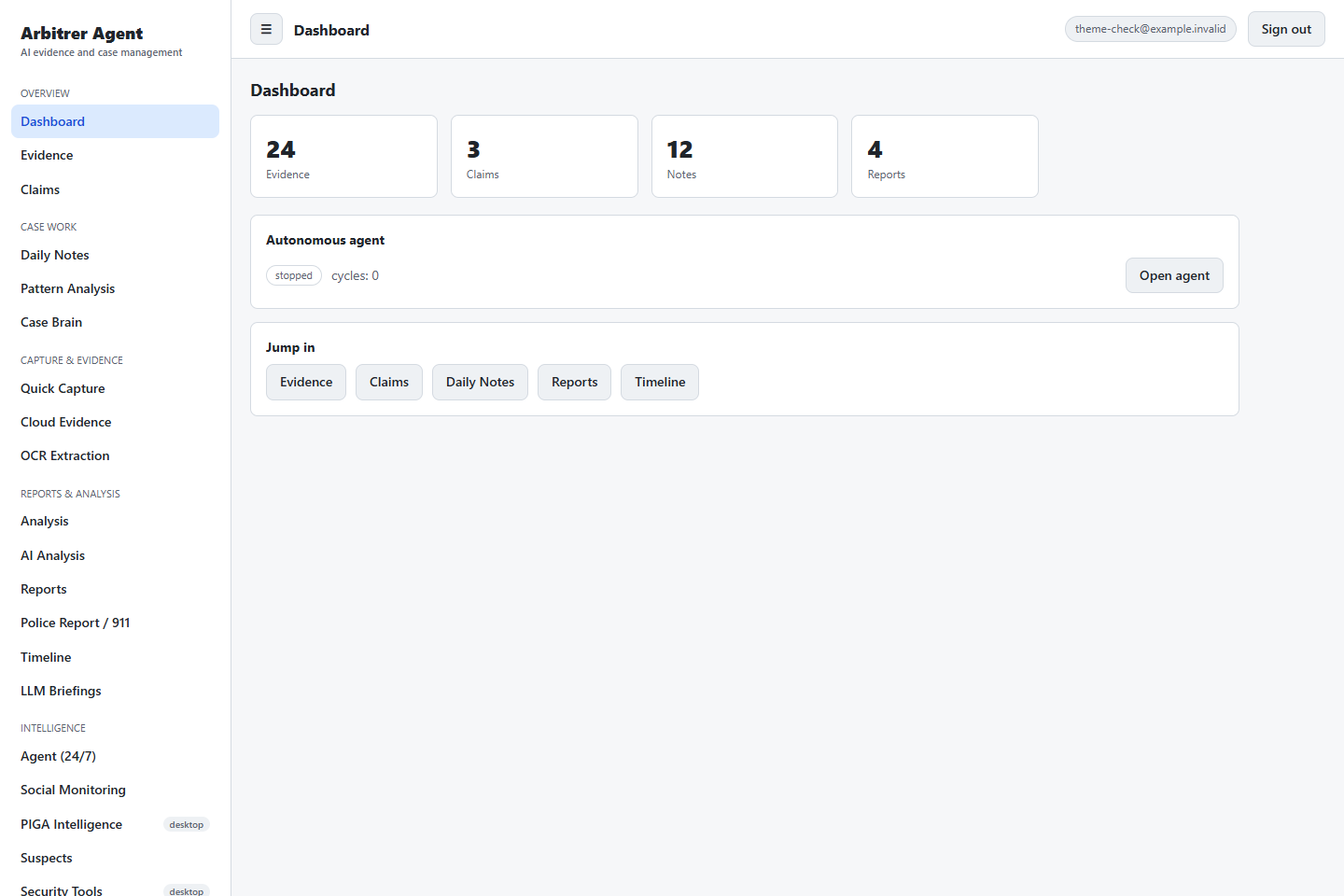
Review connected findings and manage analysis cycles, provider settings, and optional scheduled analysis.
AI, OCR, and scheduled analysis depend on configuration. Native screen, network, PIGA, and security tools are desktop-companion features, not cloud monitoring services.
Actual web interface shown with illustrative test data. No customer records are displayed.
How it works
A more considered next step.
Start with your records. Use AI for assistance. Review before you act.
01
Capture & organize
Create your workspace. Add evidence, notes, and claims from information you are authorized to collect.
02
Analyze & connect
Review timelines and patterns, and use configured AI tools to help make sense of your case.
03
Prepare your handoff
Review generated drafts and supporting records with a qualified professional or relevant authority.
Windows Desktop
Arbitrer Agent Lite
Get the foundational desktop tools for evidence, claims, notes and reports. CAD $48.51 one-time for this release. Advanced modules are reserved for upcoming editions.
Lite for Windows
Windows 10 / 11 · 64-bit · Version 1.0.0
CAD $48.51 one-time. Sign in, complete your purchase through Stripe, and download from your account.
Need a customized version for your own computer, your team, or a particular workflow? Commission a tailored build, including local-computer deployment. Contact us to discuss requirements and a custom quote.
No. AI Lawyer describes assistance with evidence analysis, case organization, and document drafting. Arbitrer Agent is not a law firm and does not provide licensed legal representation. AI output can be incomplete or incorrect; review it with a qualified professional.
What does AI Guardian actually do?
It helps you organize digital incident evidence, review recurring patterns, and prepare reports. It does not provide physical protection, guarantee safety, or automatically monitor your devices from the cloud.
Can I use it in my browser?
Yes. Create an account and sign in to the web workspace. Desktop-only PIGA and native security tools are separate from the browser app. Contact the team about desktop setup and availability.
Do AI features need extra setup?
Some do. AI analysis, OCR, and briefings depend on the provider and settings you configure. Scheduled analysis also needs to be enabled and configured. Availability can differ between web and desktop.
Does the app contact police or emergency services?
No. It can help prepare reports and call notes, but does not dispatch emergency services. If you are in immediate danger, contact your local emergency service directly.
Where can I ask about plans or support?
Visit our contact page for plan and licensing questions, or our support page for help with the product.
Your next step
Support when you need it.
Ask a question, share feedback, or discuss a version tailored to your work. Contact is optional and does not enrol you in marketing emails.
Help with your edition
Contact the team without sharing evidence or purchasing a plan.